
Free Video Player for macOS
ELMEDIA is a Mac media player that offers advanced playback and streaming options. It plays almost any video/audio format and lets you stream your media to Apple TV, Smart TVs, Google Cast-enabled devices (including Chromecast and Android TV), and other AirPlay- or DLNA-enabled devices for a bigger-screen experience.

4.5 rank

Complete Control Over Your Movie Experience on Mac
Adjust audio delay to sync with the video, speed the movie up, slow it down, adjust video brightness, saturation, contrast, and way more. Use the timeline preview thumbnails to make seeking easier. Throw in bookmarks, and you’ve got the recipe for an excellent Mac movie player.

Preview thumbnails

Сontrol and hotkeys

Online subtitle search

Hardware acceleration

Support for external audio and subtitles

Speed control
macOS Video Player with Subtitle Support
Not only does Elmedia offer extensive subtitle support, but it also lets you decide how they will look during playback. You can choose to either load them manually or automatically. SRT, ASS, SMIL, and other formats are supported. Set a custom subtitle delay to sync them with a video - useful if the original file has issues.


Popular video formats
Video Player for Mac for Effortless Home Streaming
Thanks to Elmedia Player, you can effortlessly stream your media files to Apple TV and other AirPlay-compatible devices, Google Cast-enabled devices (including Chromecast and Android TV), Roku, and DLNA-enabled TVs. Besides that, the player supports receiving and playing streamed media via AirPlay with excellence. For example, you’ll be able to stream music from your phone to your Mac, making use of the larger speakers.

Apple TV and other AirPlay devices

Smart TV, Roku, DLNA devices

Chromecast and Android TV
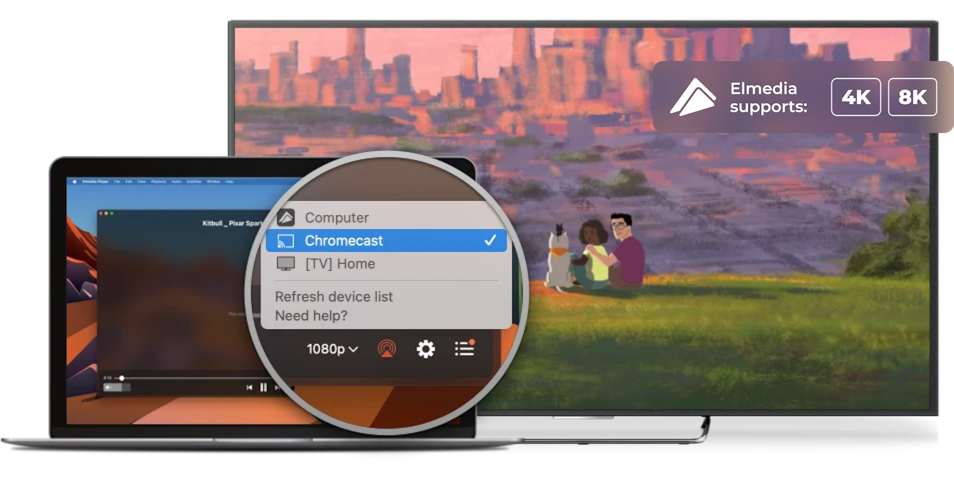
Video player for Mac with enhanced compatibility
With Elmedia Player, you can stream and play an extensive range of formats directly from your Mac. Enjoy smooth, reliable playback across different screens and devices.
Clear it up with subtitles
Elmedia supports either embedded or external subtitles. This way, you’ll get the complete streaming experience.
Control your stream
Even though your videos are streaming to another device, you have full control over them through Elmedia - play, pause, seek, or stop the video.
Broadcast your playlists
Compile your playlist and watch it on a widescreen TV with every convenience that Elmedia has to offer.
Bask in the glory of Ultra HD
You can easily stream high-definition videos to 4K-compatible devices - Google Cast-enabled devices, including Chromecast and Android TVs, Apple TV, Roku, and DLNA-enabled Smart TVs like Samsung, LG, Sony, Panasonic, etc., as well as AirPlay-compatible devices.


Elmedia Player
4.5 rank
(
Learn more
)
Use Flexible Settings to Refine Your Audio
Elmedia is also a good music player for Mac, with many codecs included. It can play music in almost any format: MP3, AAC, FLAC, etc. With Elmedia, you can fine-tune your listening experience using the built-in audio equalizer, adjust playback speed, and explore more advanced playback options.

Built-in Volume Control
Adjust sound directly within the app and control audio levels without changing system volume settings. Useful when switching between different media types or output devices.
Audio Equalizer
With the 10-band graphic equalizer, sound can be manually tuned to your liking. You should also try our artfully composed presets.
AC3/DTS through S/PDIF
Elmedia supports sending digital audio in AC3 and DTS formats via S/PDIF, letting you enjoy surround sound on compatible receivers, ensuring high-quality audio for movies and music.
Audio Visualizer
Elmedia Player’s audio visualizer comes with a multitude of options. Experience music in ways that you haven’t tried before!
Supported Media Formats
This media player for Mac has native support for a large number of multimedia formats, including:
See full list of suported formats
Most Popular

How to Play MKV Files on Mac: Best Solutions - Elmedia Player
Mac devices won’t support playing MKV files out of the box. Discover the best methods to play MKV files on your Mac device for the optimum solution.
Olga Weis
Jun 3, 2025

VLC vs IINA comparison as of 2026 - or Try Elmedia video player
Which Is Best VLC, IINA, or Elmedia Player? We compare all three across various categories to help you choose the best for your needs.
Olga Weis
Apr 23, 2025

VLC No Audio Problems - Reasons and Ways to Fix
If you are facing the issue: The VLC Audio Not Working while playing videos, learn more about how to fix VLC No Sound Errors.
Olga Weis
Sep 30, 2024
FAQ
Yes. Elmedia Player offers all essential playback features for free: you can watch videos, listen to audio, manage subtitles, switch tracks, and organize playlists without any limits. Activation is only needed for advanced tools like сolor and picture adjustment settings, screenshot series, or streaming to external devices, etc.
No activation is required. Once you complete your purchase on the App Store, all PRO features become available automatically. You can start using the full version of Elmedia Player right away.
Follow these steps to set Elmedia Player as a default for the specific format:
- Launch Finder and locate a video file.
- Right-click the file and choose the “Get Info” option.
- In the “Get Info” window, expand the “Open with:” section.
- From the drop-down menu, select Elmedia Player.
- Click the “Change All… ” button (this will apply to all files of that same format).
- Click “Continue” to confirm the prompt.
Elmedia Player supports virtually all popular video and audio formats. You can play MP4, AVI, MOV, MKV, FLV, WMV, MP3, FLAC, and many others without installing extra codecs or plugins. Full list can be found here.
What Other Users Are Saying About Elmedia
5
I am extremely impressed by this app. I had previously tried using the FFᴘʟᴀʏ utility to play back VVC video, but it had such high CPU utilization that I couldn’t watch 4K content. Elmedia Video Player, on the other hand, is so efficient that it only uses about 3/8ths of my M3 MacBook Air’s CPU to play back 4K HDR VVC — the most computationally intensive video format available!
4.8
Elmedia Video Player for Mac offers a wide range of features to meet all your multimedia needs. You can stream directly to Smart TV or Apple TV.
4.8
It can play any file format including the widely-used ones like AVI, MP4, FLV, SWF, WMV, MKV, MP3, M4V, etc without the need of installing any other plugin or codec.
4.8
Elmedia Player has a wide variety of other features and capabilities, but having the ability to play just about every possible video format, tweaking settings as needed for sync, audio and video problems.


Requirements:
